
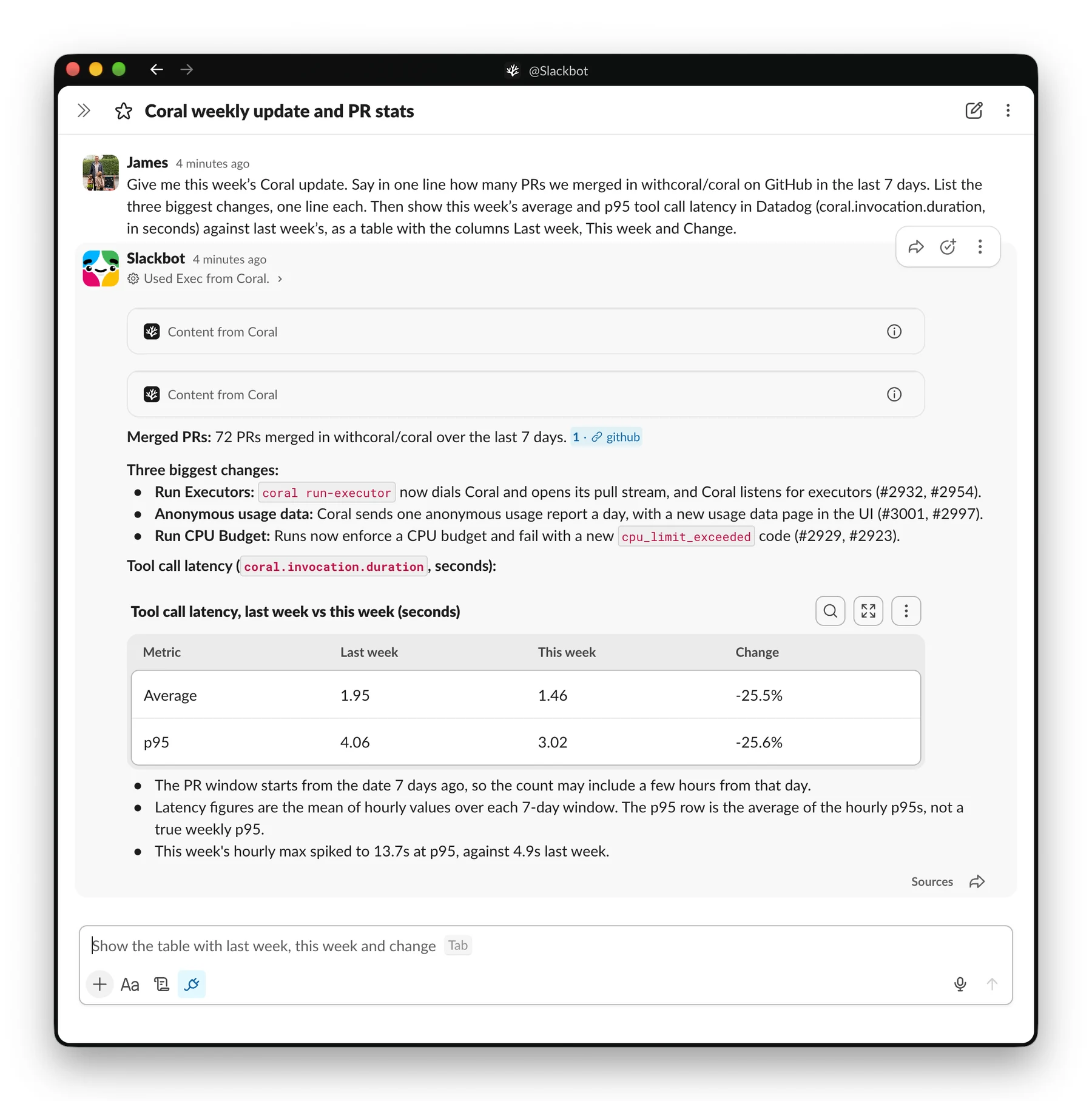
Slackbot can now connect to Coral. Here it is answering one question that needs both GitHub and Datadog:
In June, Slack gave Slackbot an MCP client. The suggested path is to add each vendor’s own MCP server: Linear’s, Atlassian’s, Amplitude’s, one per product. That approach works for a question about one tool, but most work spans several. A release blocker lives in Linear, GitHub and PagerDuty at once. A customer’s health lives in Salesforce, Zendesk and your inbox.
Coral sits between Slackbot and your tools, and changes how Slackbot uses them. With Coral, Slackbot answers questions across tools in one step, at a fraction of the token cost. Each person works with their own accounts, under one finer-grained policy across every tool. Slackbot can also reach any API or MCP server, including your internal systems, and reuse saved functions on repeat tasks.
MCP servers give Slackbot tools. Work needs answers across them
With direct MCP servers, Slackbot calls one tool at a time. Each call is a round trip through the model, and each raw result lands in Slackbot’s context. A question that joins three tools becomes a long chain of calls, and every intermediate result stays in context while the model reasons.
The model has to track hundreds of fields it doesn’t need, join them itself, and drop nothing along the way. Each step adds time and tokens, and another chance to get it wrong.
With Coral, Slackbot writes one short program instead, and Coral runs it. Here is Slackbot’s program for the weekly update above:
async function weeklyCoralUpdate() {
    const now = Math.floor(Date.now() / 1000), wk = 604800;
    const since = new Date((now - wk) * 1000).toISOString().slice(0, 10);
    const s: any = await coral.providers.github.search.issuesAndPullRequests({
        q: `repo:withcoral/coral is:pr is:merged merged:>=${since}`,
        per_page: 100
    });
    const prs = (s.data?.items || []).map((i: any) => ({ number: i.number, title: i.title, comments: i.comments }));
    const stat = async (m: string, from: number, to: number) => {
        const agg = m === "avg" ? "avg" : "max";
        const r: any = (await coral.providers.datadog.queryMetrics({
            query: `${m}:coral.invocation.duration{*}.rollup(${agg},3600)`,
            from,
            to
        })).data;
        const v = (r.series?.[0]?.pointlist || []).map((p: any) => p[1]).filter((x: any) => x != null);
        return v.reduce((a: number, b: number) => a + b, 0) / (v.length || 1);
    };
    const out: any = { merged_count: s.data?.total_count, prs, latency: {} };
    for (const m of ["avg", "p95"]) {
        const last = await stat(m, now - 2 * wk, now - wk), cur = await stat(m, now - wk, now);
        out.latency[m] = { last, this: cur, change_pct: ((cur - last) / last) * 100 };
    }
    return out;
}
Through direct GitHub and Datadog servers, Slackbot gets the merged pull requests back in full, then four series of hourly latency points, and does the arithmetic in the model. Every response lands in its context. Through Coral, the search, the four metric queries and the averages run in code. Slackbot reads a count, the pull request titles and six numbers. The same program could call your incident tool or your CRM too, and join the results before Slackbot sees anything.
We measured the difference. In a blind benchmark of 100 enterprise tasks across GitHub, Slack, Linear and Notion, Claude Haiku 5.5 with direct MCP servers cost about $0.02 per task and got 98% of them right. With Coral, it cost about $0.006 per task, 70% less, and got 99% right.
The benchmark ran Claude Haiku, not Slackbot. But tokens measure the work on any model: how much it had to read, and how many round trips it took.
Start with their APIs. End up with your tools
Vendor MCP servers give Slackbot tools shaped like each vendor’s API. Through them, Slackbot works out each task from scratch, every time you ask.
With Coral, Slackbot keeps what worked. Ask it to save a program, and Coral stores it as a function. Nobody sits down to build these: your tools take shape as the work gets done.
After the weekly update, we asked Slackbot to “save that as a function so I can ask again next week”. It saved the program above as coral.functions.coral.saved.weeklyCoralUpdate. The next time you ask, it’s one call:
return coral.functions.coral.saved.weeklyCoralUpdate();It’s TypeScript you can read. It belongs to the person who saved it, because a user’s saved functions are private to them. And it gets no extra power: every call inside it goes through the same policy, approvals and account as any other call.
Every request also leaves a record in Coral: the program, every call it made, and every approval.
Five MCP slots don’t match your stack
Slackbot allows each person five active MCP servers, and a vendor server covers one product. But most of your internal systems have no vendor server at all: your deploy tracker, your admin API, your warehouse.
Coral uses one of those five slots. Behind it are 200+ ready-made integrations, from GitHub and Jira to Salesforce, Stripe and Snowflake. You can also add any API or MCP server as a provider, so internal APIs and databases work too.
Every MCP server makes its own identity decision
Slack says that “every MCP call is made as the authenticated Slack user” (Slack, 2026). That describes how Slack identifies you to the server. Which account the server then uses with the tool behind it is the server’s own decision. Some use your own account. Others use one shared service account for everyone.
You only find out which account is used as you connect, server by server. Shared accounts are common: 43% of organizations rely on shared service accounts for their AI agents (CSA, 2026).
With Coral, a workspace owner decides once per provider. People sign in to Coral through your chosen identity provider. For each provider, the owner chooses individual accounts (where every call uses the requester’s own account) or a single shared account. Coral never falls back from one to the other. You can also add a provider twice: a shared, read-only GitHub for questions, and an individual-accounts GitHub so that pull requests are opened by the person who asked.
Control is scattered across servers
With a stack of MCP servers, each one brings its own controls. Slack’s per-tool admin controls exist only on its Enterprise Grid and Enterprise+ plans, and they rely on how each server labels its own tools. Slackbot’s consent prompt asks people to allow each tool call, and “Always allow” soon becomes the habit. Each vendor applies its own rules on top.
Coral gives you one policy across every tool in every provider. Each tool is set to Allow, Ask or Block. By default, read-only tools are Allow, and everything else is Ask, so it waits for approval. When a call needs approval, the person sees exactly what will run and with which account, and the approval covers that call only. Slackbot can’t see blocked tools.
Coral checks that policy at every call, not when a session starts. Disable a user, and their next call fails, even inside a request already running. Remove them, and Coral deletes their stored credentials.
Slackbot’s consent prompt still appears with Coral, but it has less to decide. Coral gives Slackbot a handful of tools, and one of them runs programs. Most people will choose “Always allow” for it. Slack’s admin controls see that one tool too, not the calls inside a program. So the control moves from Slack to Coral: whatever you allow in Slack, Coral’s policy decides each call a program makes.
Credentials end up in one place you control
With vendor MCP servers, Slack stores a token for each server a person connects (Slack, 2026). Five servers means five tokens per person, and each one opens a vendor’s tools directly.
With Coral, Slack holds one token per person, and it is for Coral. That token can do only what your policy allows. Provider credentials live on your servers, encrypted. They never go to Slack or to the model. The program Slackbot sends runs in a sandbox with no credentials and no network access of its own. Coral adds the credential only when it makes the call.
At a glance
| Slackbot + vendor MCP servers | Slackbot + Coral | |
|---|---|---|
| MCP slots | One vendor server per product, maximum five; internal systems often have none | One of the five slots, with 200+ integrations behind it, plus any API, MCP server or database you add |
| Questions across tools | One tool call at a time; every raw result stays in Slackbot’s context | One short program that Coral runs; filtering and joining happen in code |
| Benchmark | About $0.02 per task, 98% right | About $0.006 per task, 99% right (blind benchmark, 100 tasks, Claude Haiku 5.5) |
| Whose account | Each server decides: the user’s own or a shared one | The owner chooses per provider: individual or shared, with no fallback |
| Permissions | Each server has its own controls; Slack’s per-tool admin controls need Enterprise Grid or Enterprise+ | One policy for every tool: Allow, Ask or Block, checked at every call |
| Credentials | Slack stores a token for each server a person connects | Slack holds one Coral token per person; provider credentials stay encrypted on your servers |
| Repeat tasks | Worked out from scratch each time | Saved as your own function and called in one step |
When a vendor server is enough
If your team lives in one tool, that vendor’s MCP server is the simpler choice. There is nothing to run, and the vendor maintains it.
Coral has costs. You run it on your own servers. A workspace owner adds each provider and sets its policy. A call that needs approval sends you to a Coral page, outside Slack. And Slack’s admin console sees Coral as one server, not the tools behind it.
Coral is worth it when the work crosses tools, or when you need one answer to “whose account, and under what rules?”
Try it
Coral is open source. Deploy it on your own servers, add it to Slackbot, and ask a question that needs more than one of your tools. Or talk to us about a deployment.